MuseCanto - 写好每一章
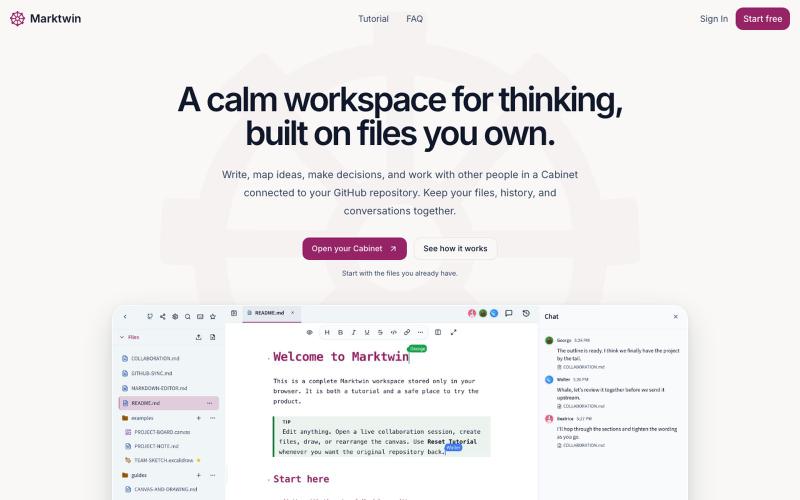
MuseCanto 一体化内容创作平台,支持多平台发布和追踪。
@wztlink1013 · X
自己写了一个工具,专为内容创作者多平台发布, 富文本编辑体验,同时支持多个平台的格式平替兼容。
完整作品展
技术栈
60 projects

MuseCanto 一体化内容创作平台,支持多平台发布和追踪。
@wztlink1013 · X
自己写了一个工具,专为内容创作者多平台发布, 富文本编辑体验,同时支持多个平台的格式平替兼容。

按周组织待办事项,每周日决定哪些任务继续下周,哪些删除。
@faruque · X
TodoWeek: Works like a paper notebook, one week per spread, and every Sunday you decide what todos slide over to next week, and which ones get dropped. Mostly vibe coded with Claude Fable + Laravel 13 Vue starter kit.

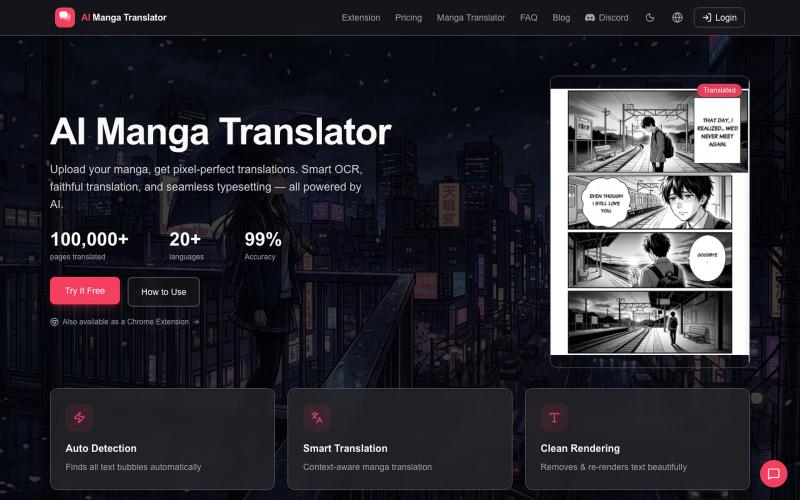
上传漫画图片,一键翻译成多种语言,保留原始艺术。
AIMangaTranslator — 用 AI 翻译漫画 - [更多介绍](https://github.com/1c7/chinese-independent-developer/issues/160#issuecomment-2120097059)


将Basecamp项目日历合并为统一的iCal日历源,支持谷歌日历、Outlook和Apple日历。
bhagyeshsp · HN
First things first: On the landing page, click on the "demo" link below the Hero section to try it without jumping any hoops ** I'm a long-time Basecamp user and satisfied with its overall functionality. Of course, there are many things that can be improved but that is not the point of this post. *Background* Basecamp lets users create "Projects". These projects are isolated workspaces that contain: members, todos, chat, files, message board, and calendar, etc. My issue was with the scattered calendars. Because I (and every other Basecamp user) creates a dedicated project for different scope of work, even if it is for the same client. For example, at any given time, I may have 4 projects for client-X and 3 projects for client-Y. *My pain point* I have experienced that most clients (especially the decision-makers) do not use Basecamp as often as we--the agency folks use it. They just use it when some reviews or comments are required or some file access. The clients organize their


Bar 4 Bar:为音乐人和诗人打造的智能押韵笔记本,支持逐小节AI创作。
@lostsignal8_ · X
for writers. ✍️ It can be used for any direct/intent form of writing such poems and song lyrics. A beautiful place to organize, brainstorm, and store it all.🧬📖

Genesis OS是一款AI副驾驶生态系统,协助您完成生活和工作各方面的任务。
@GenesisAIApps · X
A smart AI copilot ecosystem for life, work, and beyond the stars.

用 AI 阅读圣经,获取经文洞察,遵循阅读计划,记录祷告,融入信仰社区。
@ridtche · X
Check out what I just built with Lovable!

在一个安全的地方整理和管理密码、documents 以及数字遗产信息。
@DLVaultApp · X
Most families aren't prepared for someone's digital life. Passwords. Documents. Recovery information. Important instructions. Digital Legacy Vault helps you organize everything securely and decide exactly who can access it when it's needed. #buildinpublic

图片转 ASCII 字符画、复制符号、查看码表、进制转换——全在浏览器。
HeStudy · V2EX
做了个纯前端的 ASCII 工具站:图片转字符画、banner 生成、符号一键复制 平时偶尔需要查 ASCII 码表、复制一些特殊符号(箭头、制表符这类),每次都是搜一个满屏广告的老站凑合用,索性自己做了一个: https://getascii.com 目前有这些工具: 图片转 ASCII 字符画(拖一张图进去就行,支持调宽度/字符集/反色) 文字转 ASCII banner 大字 常用符号一键复制(箭头、制表符、数学符号、颜文字) 完整 ASCII 码表 + 一个交互式键盘映射图(点键盘上的键显示对应的 dec/hex 码) 进制转换器( hex/dec/bin ↔ ASCII ) 几个实现上的点: Astro 构建的纯静态站,所有工具都是纯客户端计算,图片不会上传到任何服务器 没有账号系统,没有付费墙,打开就用 整站是绿色荧光终端风( CRT 扫描线 + JetBrains Mono ),算是给终端审美交个作业 顺手给它做了个 25 秒的宣传片: https://www.youtube.com/watch?v=AjzU5mw1PrI

Voidocs 为初创团队创建专业文档,无需代码配置。
@hannah24_app · X